On Device Message
Plugin: Devices | Mode: Listen
React to incoming messages from your OSC, UDP, TCP, HTTP or Serial Devices.
Settings
device
The device to react to.
Choose the device from the list (select) or enter the device name, device ID or a Variable that references a device item with a device name or device ID (custom).
You can add devices in the Device Settings.
if
Check incoming messages from the device and trigger the next state if applicable.
In the chapter Querying Conditions with conditions you can find out how to query the incoming message.
The value of the condition is the incoming message.
field
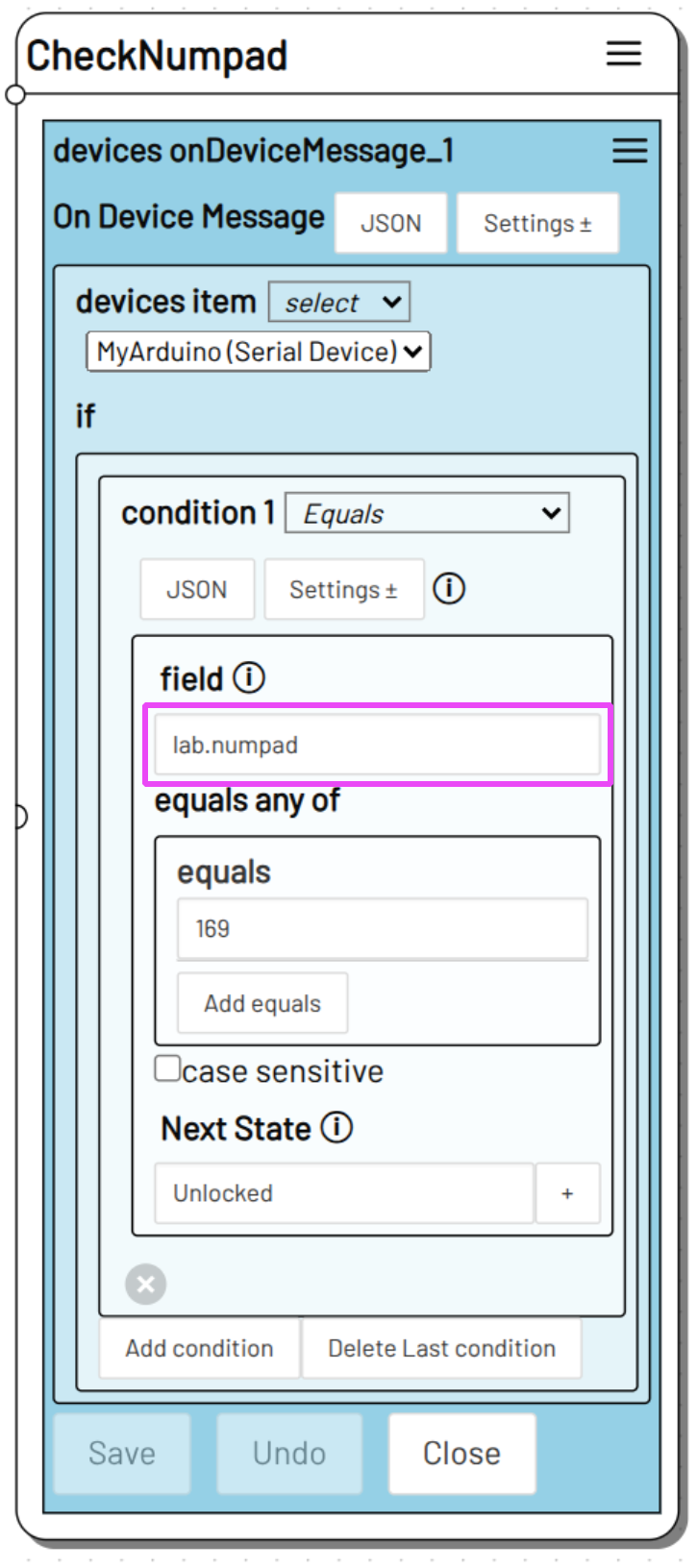
Use field to query a specific value within a JSON message. You can use dot notation to specify deeper values in the JSON message.
To query the "numpad" value in the following JSON message
For field you can enter
lab.numpad
else
Specify the next state that is triggered if none of the if conditions apply to the incoming message or if you have not specified an if condition.
If you have not defined an if condition, every message received by the device triggers the next state.
keep listening and queue
optional
Mutes the listener instead of closing it completely when the state containing On Device Message is exited.
Incoming messages are then no longer responded to, but the incoming messages are stored.
If the state containing this On Device Message action is called up again, the stored messages are checked first before the listener starts listening for further messages.
Info
In the chapter on Loops you will find additional information on keep listening and queue
Action data
You can access the last incoming device message that you are listening to in the Action Data variable. Use for example:
to access the part of the received message of the top-level On Device Message action in the state AwaitOSCTrigger that matched the condition.
match
The part of the received message that matched an if condition in the On Device Message action.
e.g: 15
message
Content of the message to which the On Device Message action has responded.
e.g: Countdown has 15 seconds left.
OSC addresses
Incoming OSC addresses are converted to JSON. The address path of the message becomes JSON fields, each of which contains the message that is being addressed.
The message /some/osc/message 123 is sent as
and can be checked via field in the if condition.
Use some.osc.message as field to set a condition for the value of the message for the above example.
HTTP Requests
Depending on the request method, On Device Message will interpret the request query or the request body as an incoming JSON message.